
Download & Install Python:
Download and install the latest Python version for Windows from https://www.python.org/downloads.
Open Command Prompt and run following command to check if Python was installed properly.
> python --version
It will show the version information if working properly.
Install PIP:
PIP is a package manager for Python packages, or modules. If you have Python version 3.4 or later, PIP is included by default. Check PIP version with the following command.
> pip --version
Install IDE (VS Code):
Download & install VS Code from Microsoft and install Python extension by Microsoft in it.
Project Directory Setup:
Create a directory named PYTHON in a drive other than C. Literally this is an optional setup but helps organize your job.
Create a Directory for your Django Project:
Navigate to PYTHON directory from Command Prompt and run the following command to create a directory for your new Django project.
> cd D:\PYTHON

> D:\PYTHON> mkdir helloworld

> D:\PYTHON> cd helloworld

> D:\PYTHON\helloworld>
Install Virtual Environment:
Install virtual environment for django in your project. Here .venv will be your virtual environment directory which you will be calling later.
> python -m venv .venv
Now activate the virtual environment with below command.
> .venv\Scripts\Activate.ps1
If activated, you will see something like below.
(.venv) PS D:\PYTHON\helloworld>
Install Django:
Run the following command to install Django in your project helloworld.
(.venv) PS D:\PYTHON\helloworld> pip install Django
Create a Django Project:
(.venv) PS D:\PYTHON\helloworld> django-admin startproject helloworldproject .
Here the ending dot (.) is particularly important because without that, django will create another helloworldproject directory inside the original helloworldproject directory.
Well, at this stage you will be able to find the following files created inside the helloworldproject directory.
helloworld/
│   ├── helloworldproject/
│   │   ├── __init__.py
│   │   ├── settings.py
│   │   ├── urls.py
│   │   └── wsgi.py
│   │
│   └── manage.py
│
└── .venv/
Start the Development Server:
Once your file structure is set up, you can now start the server and check that your set up was successful. In the console, run the following command:
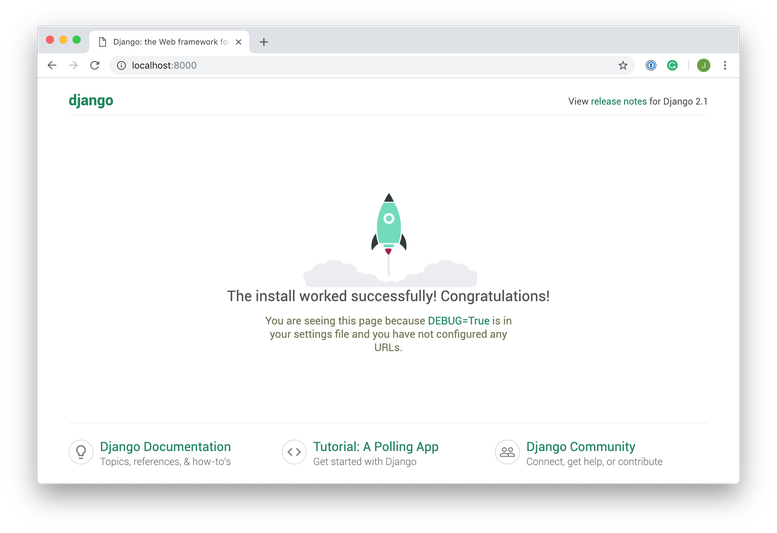
> python manage.py runserverThen, in your browser go to localhost:8000, and you should see the following: